توضح هذه الصفحة كيفية طلب حذف حسابك في أورامو، والبيانات التي يتم
حذفها أو الاحتفاظ بها.This page explains how to request deletion of your Oramo account,
and what data is deleted or retained.
Steps to delete your account
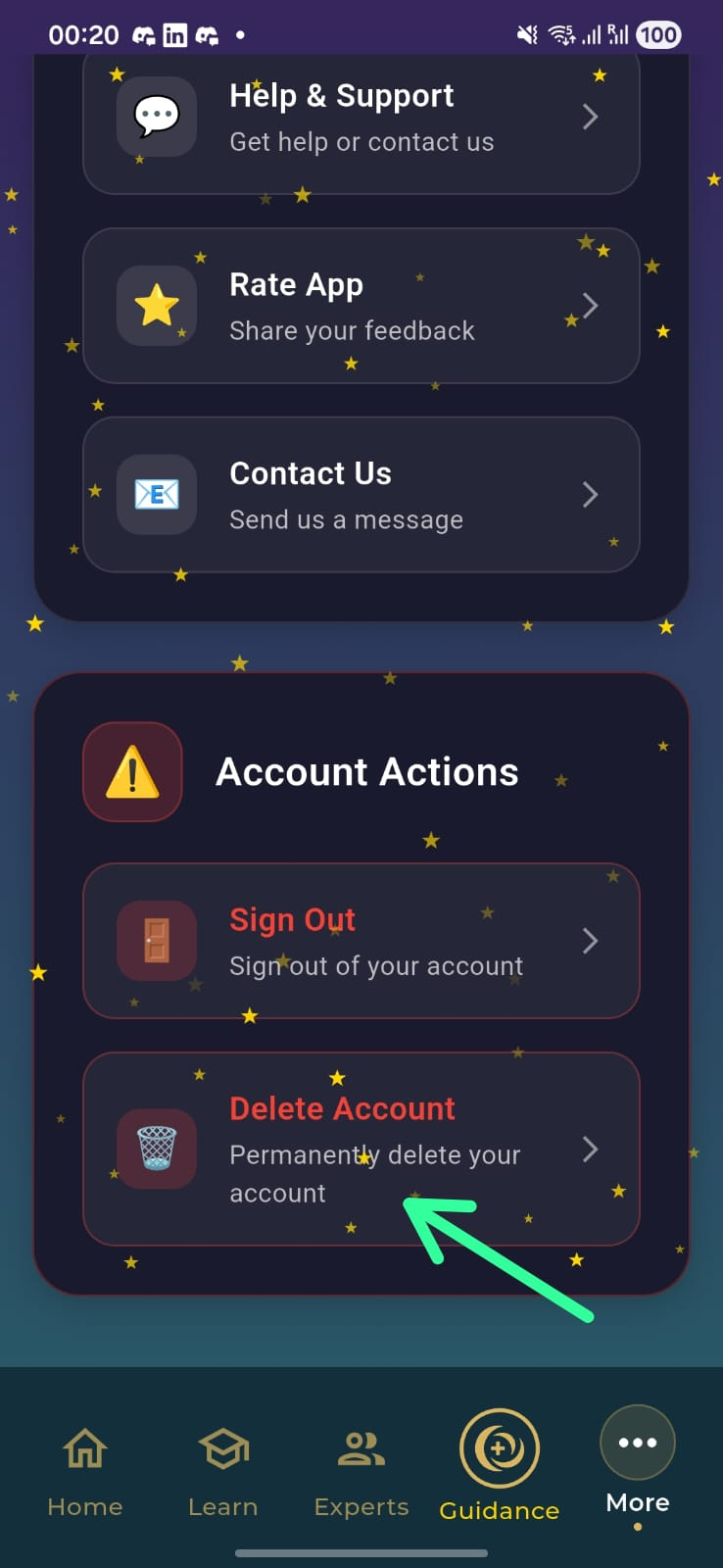
Open the Oramo app and go to the More tab.
Scroll down to find Delete Account.
Follow the on-screen prompts to confirm deletion.
Data that is deleted
Profile and registration data (name, email, phone if
provided).
Account identifiers and preferences.
Test and assessment responses and results.
In-app messages or support requests tied to your account.
Data that may be retained
Records required for legal, accounting, or fraud-prevention
purposes.
Aggregated, anonymized analytics that do not identify you.
Retention period: up to 30 days for deletion processing, and up
to 7 years for legally required records.
خطوات حذف الحساب
افتح تطبيق Oramo وانتقل إلى تبويب المزيد.
مرّر للأسفل حتى تجد خيار حذف الحساب.
اتبع التعليمات لإتمام عملية الحذف.
البيانات التي يتم حذفها
بيانات الملف الشخصي والتسجيل (الاسم، البريد الإلكتروني، رقم
الهاتف إن وُجد).
معرّفات الحساب والتفضيلات.
إجابات ونتائج الاختبارات والتقييمات.
رسائل الدعم أو المراسلات المرتبطة بحسابك.
البيانات التي قد نحتفظ بها
السجلات المطلوبة لأغراض قانونية أو محاسبية أو لمنع الاحتيال.
بيانات تحليلية مُجمّعة ومجهولة الهوية.
فترة الاحتفاظ: حتى 30 يومًا لمعالجة الحذف، وحتى 7 سنوات للسجلات
المطلوبة قانونيًا.
مثال لموضع خيار حذف الحساب في تبويب المزيد.Example location of the Delete Account option in the More
tab.